
Special Deal: Unlimited GMB Leads + WhatsApp Sender — Only $19! BUY NOW!

Citation Generator

APA
MLA
Chicago
Harvard
IEEE
📖 Book
📄 Journal
🌐 Website
📰 Article
⚠️ Please fill in all required fields.

📋 Generated Citation

APA
✍️ Your citation will appear here after clicking Generate…

All Citation Styles

Citation Generator – Create Accurate References & Bibliographies Instantly

Citing sources correctly is a cornerstone of academic writing, research papers, and professional reports. Yet, manually formatting references can be tedious, time-consuming, and prone to mistakes. Whether you’re a student, researcher, blogger, or professional, creating accurate citations in APA, MLA, Chicago, Harvard, IEEE, or Vancouver styles is essential for credibility, plagiarism prevention, and polished presentation.

Our Citation Generator is a free, online tool that simplifies this process. With just a few clicks, you can generate fully formatted references for books, articles, websites, journals, and more. No downloads, no sign-ups, and no complex formatting rules — everything happens instantly in your browser.

Using this tool not only saves time but also ensures your bibliography is consistent, accurate, and professionally presented. Imagine finishing a long research paper with dozens of sources and instantly having a perfectly formatted reference list — that’s the power of a reliable citation generator.

In this guide, we’ll explore how the tool works, its key features, extended use cases, expert tips for accurate citations, and everything you need to streamline your referencing workflow while boosting academic and professional credibility.
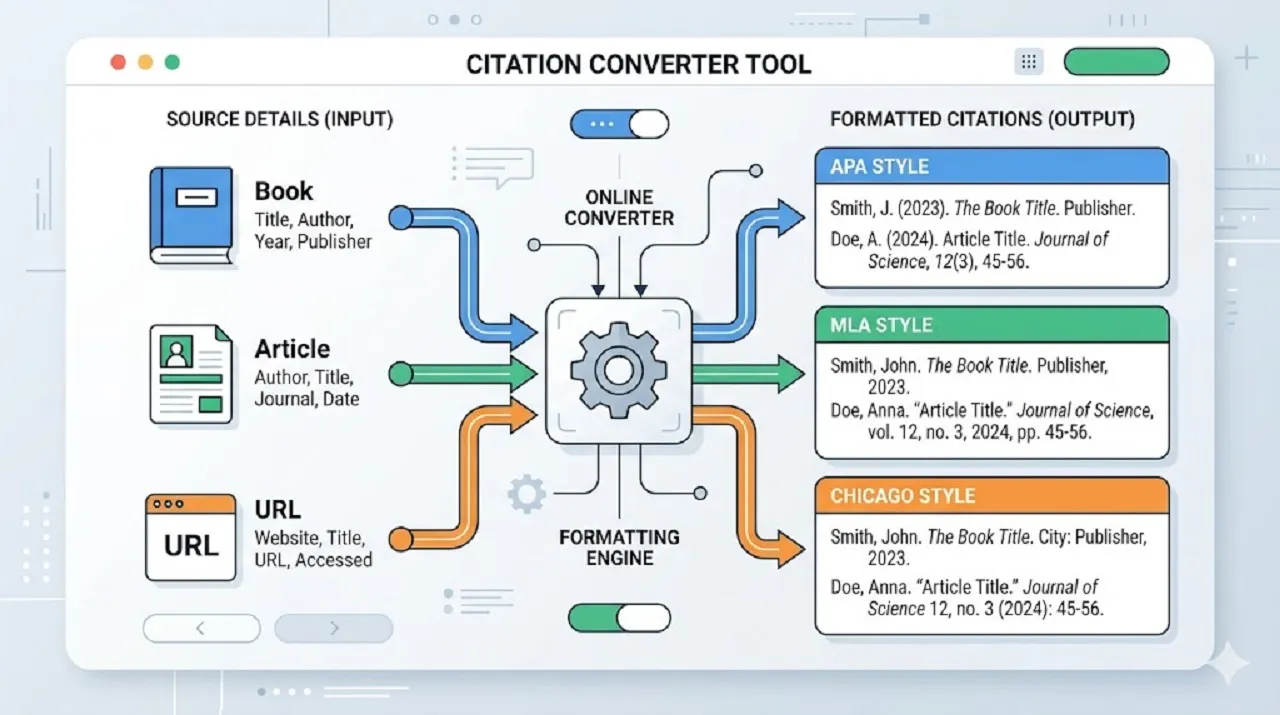
What Is a Citation Generator?

What Is a Citation Generator?

A Citation Generator is an online tool that automatically creates properly formatted references for a wide variety of sources, including books, articles, websites, videos, journals, and more. Instead of manually following complex rules for citation styles like APA, MLA, Chicago, Harvard, or Vancouver, you simply enter the source information—such as author, title & meta length , publication date, and URL—and the tool instantly produces a correctly formatted reference.

Common Uses of Citation Generators

These tools are widely used across multiple fields and purposes, including:

  • Academic Writing:
    Essays, research papers, dissertations, and term papers can be cited accurately without manual formatting.
  • Professional Reports & Documentation:
    Businesses and professionals use citation generators to reference research, reports, or market data efficiently.
  • Content Creation & Blogging:
    Bloggers, journalists, and online writers can cite sources like websites, articles, or multimedia content to improve credibility.
  • Publishing, Editing, & Legal Documentation:
    Editors, publishers, and legal professionals rely on accurate citations to maintain standards and avoid plagiarism issues.

By automating the citation process, these tools save time, reduce errors, and ensure consistency across your documents.

What is a Citation Generator and Why It Matters

A Citation Generator is an online tool that automatically formats references for books, articles, websites, journals, and other sources according to a chosen citation style, such as APA, MLA, Chicago, Harvard, IEEE, or Vancouver. Instead of manually applying formatting rules—which can be tedious and error-prone—the tool generates accurate citations in seconds.

Citations are more than just formalities; they serve critical purposes in academic and professional writing:

  • Give Credit to Original Authors: Acknowledge the creators of the content you use.
  • Avoid Plagiarism: Properly citing sources ensures you are not presenting someone else’s work as your own.
  • Maintain Academic Credibility: Accurate references show that your work is well-researched and trustworthy.
  • Support Your Arguments with Reliable Sources: Citations strengthen your claims and provide evidence for readers.
Why Use a Citation Generator

Using a citation generator offers multiple advantages:

  • Time-Saving: Format multiple references with just one click instead of doing each manually.
  • Consistency: Ensures all citations follow the same style throughout your document.
  • Accuracy: Reduces human errors like incorrect punctuation, capitalization, or order.
  • Convenience: No need to memorize complex rules for APA, MLA, Chicago, or other formats.

Imagine writing a 20-page research paper with 50 sources. Manually formatting each citation could take several hours and still risk mistakes. With our Citation Generator, every reference is instantly formatted, accurate, and ready to copy-paste into your bibliography, saving both time and effort while improving your work’s professionalism.
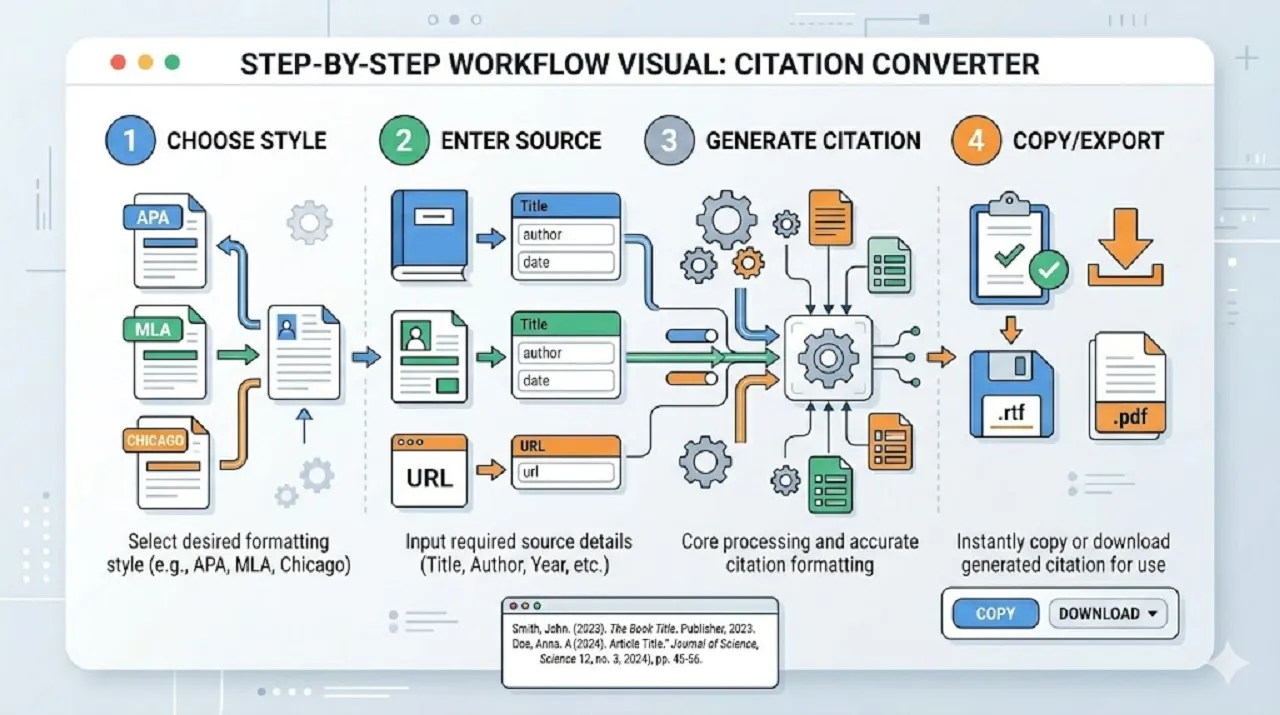
How Our Citation Generator Works (Step-by-Step)How Our Citation Generator Works (Step-by-Step)

Using our Citation Generator is simple, fast, and intuitive. Follow these steps to create accurate, fully formatted references in seconds:

Step 1: Choose Your Citation Style

Select the citation style required for your work. Our generator supports all major formats:

  • APA (American Psychological Association) – used widely in social sciences
  • MLA (Modern Language Association) – preferred in humanities and literature
  • Chicago / Turabian – ideal for academic papers, publishing, and history
  • Harvard – common in general academic writing
  • IEEE – for engineering, technology, and technical papers
  • Vancouver – widely used in medicine and scientific research
Step 2: Enter Source Details

Provide the necessary information for your source. The tool supports multiple types:

  • Type of Source: Book, Journal, Website, Article, or Other
  • Required Fields: Author(s), Title, Publisher, Date, URL, DOI (if applicable)

Accurate input ensures your generated citation is correct and complete.

Step 3: Generate Citation

Click the Generate button. The tool instantly formats your reference according to the selected style, automatically handling:

  • Proper punctuation
  • Correct capitalization
  • Accurate order of elements
Step 4: Copy or Export

Once generated, you can:

  • Copy: Paste the formatted citation directly into your document
  • Export: Generate a complete list of references for your bibliography

Pro Tip: For multiple sources, use batch entry to generate all citations at once. This saves time, reduces errors, and ensures consistent formatting throughout your document.

This step-by-step process makes citing sources effortless, schema generator whether you are working on a short essay or a long research project.

Key Features of Our Citation Generator

Our Citation Generator is designed to make creating accurate references fast, easy, and reliable. Here are the main features that make it stand out:

  • Free & Online – Works entirely in your browser with no downloads or sign-ups required. Access it anytime, anywhere.
  • Multiple Citation Styles – Supports all major citation formats, including APA, MLA, Chicago, Harvard, IEEE, and Vancouver.
  • Fast & Accurate – Generate citations in seconds with high precision, ensuring every reference meets style guidelines.
  • Supports All Source Types – Format references for books, websites, articles, journals, reports, and more.
  • Batch Citation Support – Create multiple references at once to save time on large projects or research papers.
  • Mobile & Desktop Friendly – Fully responsive design ensures smooth performance on computers, tablets, and smartphones.
  • Secure & Private – All data is processed locally in your browser; your sources and details remain confidential.
  • Copy & Export Options – Easily copy individual citations or export a complete bibliography in one click for seamless use in your documents.

These features make our Citation Generator an essential tool for students, researchers, content creators, and professionals who want accurate, professional, and hassle-free references.
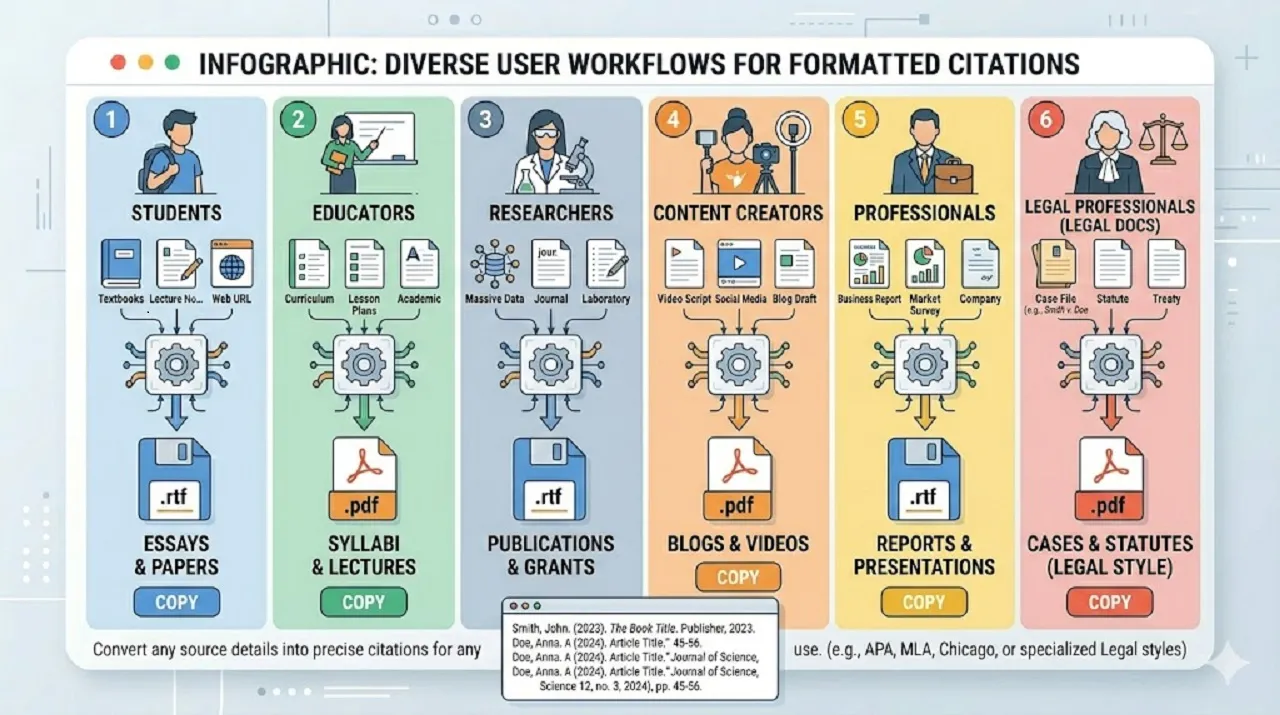
Top Uses of a Citation Generator for Students, Professionals & Bloggers

Top Uses of a Citation Generator for Students, Professionals & Bloggers

A citation generator is a versatile tool that benefits a wide range of users—from students to professionals. By simplifying the process of creating accurate references, it helps save time, reduce errors, and ensure credibility in every document. Here are the key use cases:

1. Students & Educators

Students and educators rely on citation generators to maintain academic integrity and meet formatting standards:

  • Generate references for essays, term papers, dissertations, and projects quickly.
  • Convert website URLs, journal articles, books, and other sources into fully formatted citations.
  • Ensure assignments and submissions comply with university-specific citation guidelines.
  • Save hours of manual formatting, especially for papers with dozens of sources.
2. Researchers & Academics

For researchers and academics, accurate citations are critical in journals and conferences:

  • Quickly format references for journal submissions, research papers, or conference presentations.
  • Maintain a consistent reference list across multiple research projects or publications.
  • Avoid mistakes when citing complex sources, such as online journals, DOIs, or multiple authors.
  • Simplify collaboration with co-authors by standardizing citation formatting.
3. Bloggers & Content Creators

Content creators can enhance credibility and SEO by citing sources correctly:

  • Reference online sources, quotes, statistics, or images properly to avoid plagiarism.
  • Generate professional reference lists for blog posts, tutorials, and articles.
  • Build trust with readers by providing reliable source links.
  • Improve search engine optimization (SEO) by linking to authoritative sources.
4. Professionals & Businesses

In the corporate world, accurate citations enhance professionalism and compliance:

  • Create references for reports, whitepapers, market research, and presentations.
  • Cite external studies, industry reports, and statistical data efficiently.
  • Maintain consistency with corporate documentation and regulatory standards.
  • Example: A business analyst preparing a market research report can cite 10+ studies in minutes, ensuring the report is professional, credible, and publication-ready.
5. Additional Use Cases

Beyond the main categories, citation generators are also useful for:

  • Legal documents, case studies, or policy papers.
  • Educational content creators, online courses, and e-learning materials.
  • Journalists and writers who reference multiple online notepad sources in articles.
  • Scientific publications where accurate DOIs, datasets, and journals must be cited.

Using a citation generator ensures that every source is properly credited, reducing errors, saving time, and maintaining a professional, polished presentation across academic, creative, and professional projects.
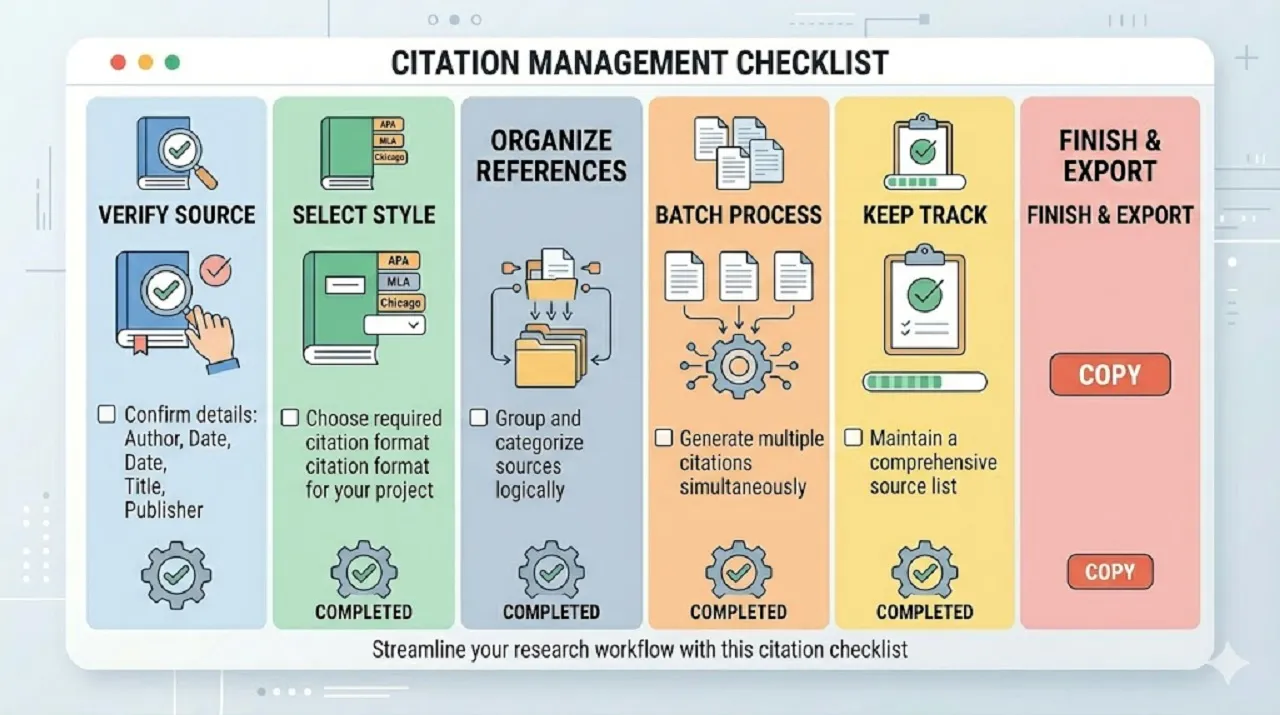
Extended Tips for Using a Citation Generator

Extended Tips for Using a Citation Generator

Using a citation generator makes formatting references faster and more accurate, but following best practices ensures your bibliography is flawless, organized, and professional. Here are key tips to get the most out of your tool:

1. Check Source Accuracy
  • Before generating citations, carefully verify all source details. Make sure author names, titles, publication dates, URLs, and DOIs are correct. Inaccurate information can lead to incorrect references, which may affect your credibility and academic integrity.
2. Select the Correct Citation Style

Always choose the style required by your teacher, professor, or publication. Whether you need APA, MLA, Chicago, Harvard, IEEE, or Vancouver, using the correct style ensures uniformity and compliance with standards throughout your document.

3. Organize References by Type

Group your sources by type—books, journal articles, websites, reports, etc. This makes it easier to manage, edit, and review references, especially in large projects. A well-organized reference list also improves readability and helps avoid missing entries.

4. Use Batch Processing

For projects with multiple sources, take advantage of batch citation generation. Enter all your sources at once to automatically create all references in a single step. This saves time, reduces repetitive work, and guarantees consistency across your bibliography.

5. Keep Track of Sources

Maintain a record of all your sources, even after generating citations. Save author names, titles, publication details, URLs, and DOIs in a separate document or spreadsheet. This makes it easier to recreate citations for future projects or update references if any details change.

Even though citation generators are highly accurate, it’s good practice to double-check each citation. A quick review helps prevent minor errors, ensures proper formatting, and keeps your bibliography polished and professional.

Why Accuracy in Citations is Crucial

Accurate citations are more than just a formatting requirement—they play a vital role in academic integrity, professionalism, and the overall quality of your work. Even minor mistakes can have serious consequences.

1. Maintain Academic Integrity

Incorrect or missing citations can be considered plagiarism, even if unintentional. Giving proper credit to original authors shows respect for intellectual property and upholds ethical standards in research and writing.

2. Enhance Credibility

Using properly formatted references demonstrates professionalism and thorough research. Accurate citations signal to readers, instructors, or reviewers that your work is well-researched and trustworthy.

3. Avoid Rejection

Many journals, universities, and publishers have strict citation guidelines. Papers with incomplete or inconsistent references may be rejected outright. Accurate citations help ensure your work meets submission requirements.

4. Improve Readability

Well-formatted references make it easier for readers to locate sources and understand your research. Clear citations improve the overall flow and comprehension of your document.

Example Scenario

A student submitting an APA-style research paper with inconsistent references may face grade penalties. Using a citation generator ensures that every reference matches APA guidelines perfectly, saving time and preventing mistakes.
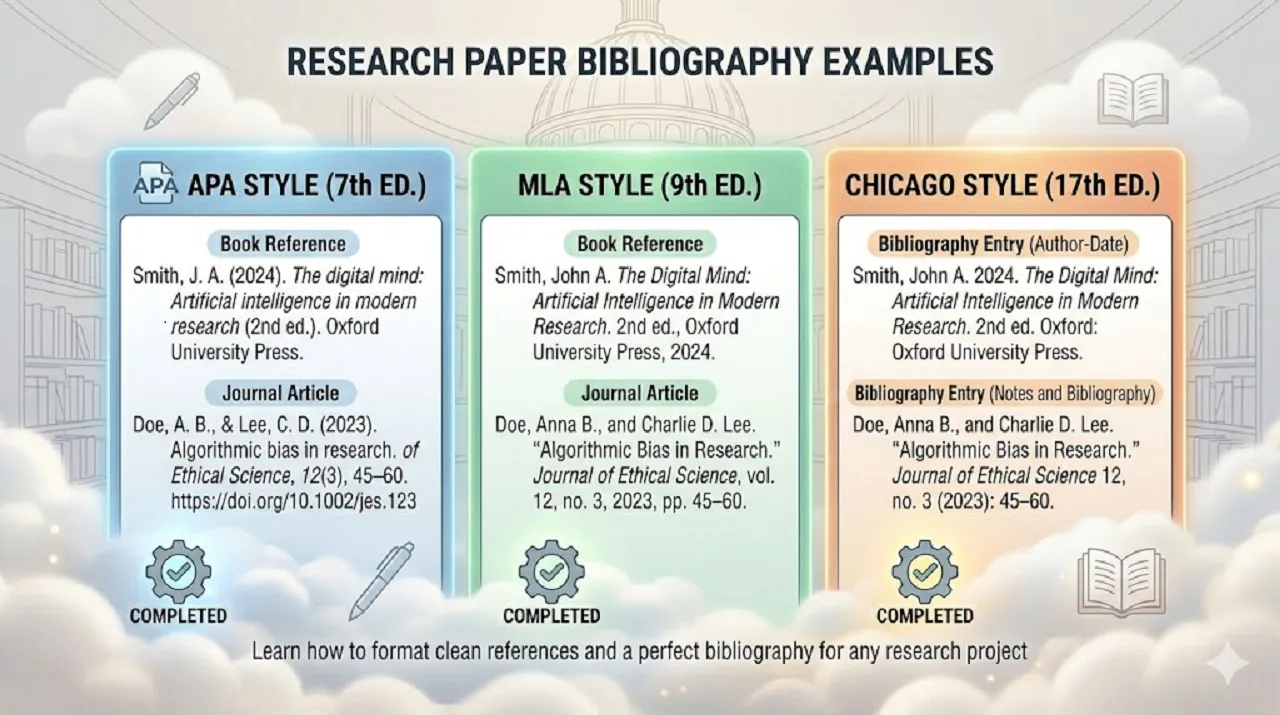
Examples of Citation Outputs

Examples of Citation Outputs

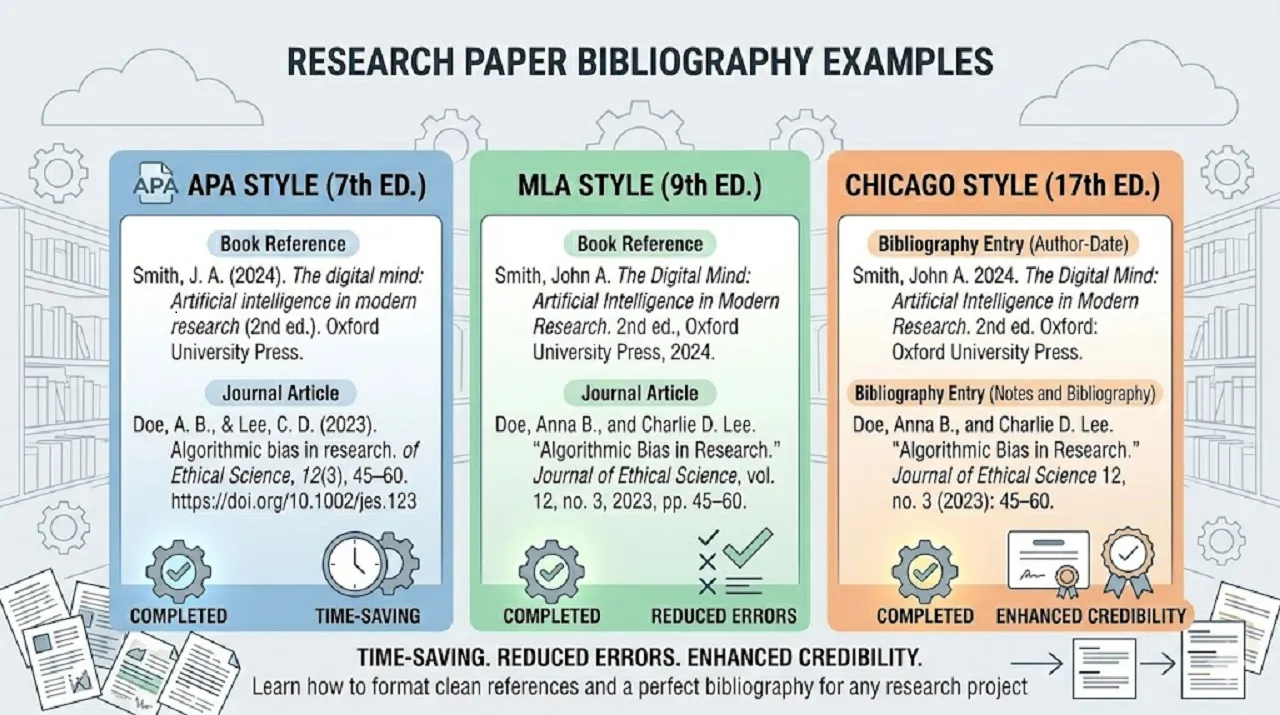
To visualize what properly formatted references look like, here are some examples:

Book in APA Style

Author Lastname, First Initial. (Year). Title of book. Publisher.

Website in MLA Style

Author Lastname, Firstname. “Title of Webpage.” Name of Website, Publisher, Date, URL.

These examples provide a clear guide for users before copying citations into their work, making it easier to produce a polished, professional bibliography..
Best Practices for Creating Accurate Citations

  • Ensuring accurate citations is crucial for maintaining credibility, avoiding plagiarism, and producing professional-quality work. Even when using a citation generator, following these best practices can help you achieve flawless references:
Always Double-Check Citations
  • Carefully review every generated citation to ensure author names, titles, publication dates, and formatting are correct. Even minor mistakes can affect the accuracy and reliability of your references.
Keep a List of All Sources
  • Maintain a complete record of all sources from the start of your project. This prevents missing references and makes managing your bibliography easier.

Use a Consistent Citation Style

  • Stick to one citation format—APA, MLA, Chicago, Harvard, etc.—throughout your document. Consistency ensures a professional presentation and avoids confusion.
Update Reference Details
  • For online sources, verify that URLs, publication dates, and other information are current. Outdated or broken links can reduce credibility.
Use Plagiarism-Check Tools
  • Combine citation generation with plagiarism-check software to ensure all content is properly credited and original.
  • Following these tips helps you create accurate, reliable, and well-structured citations every time, making your work professional and trustworthy.

Benefits of Using a Citation Generator

Benefits of Using a Citation Generator

Using a Citation Generator offers significant advantages for students, researchers, and professionals who need accurate and well-structured references. Instead of manually formatting each citation, this tool simplifies the entire process, ensuring speed, accuracy, and consistency across your work. It not only saves valuable time but also enhances the overall quality and credibility of your content.

Key Benefits Include:

  • Saves Time: Instantly generates citations in seconds, making it ideal for projects with long reference lists.
  • Reduces Errors: Automatically formats citations correctly, eliminating common mistakes in punctuation, structure, and style.
  • Enhances Credibility: Properly formatted references improve the trustworthiness and professionalism of your work.
  • Organizes Sources: Keeps your bibliography clean, structured, and consistent throughout your document.
  • Supports Multiple Formats: Compatible with APA, MLA, Chicago, Harvard, IEEE, and Vancouver styles for various writing needs.

By using a Citation Generator, you can focus more on your research and writing while ensuring your references are accurate, consistent, and ready for submission or publication.

Common Citation Mistakes and How to Avoid Them

Even when using a citation generator, small errors can still affect the accuracy and credibility of your references. Understanding these common mistakes helps you ensure your citations remain professional and reliable.

Key Mistakes to Watch Out For:

  • Incorrect Author Names
    Misspelled names, wrong initials, or missing co-authors can lead to inaccurate citations and reduce credibility.
  • Missing Publication Dates
    Omitting the publication year or using incorrect dates can make your reference incomplete and unreliable.
  • Using the Wrong Citation Style
    Applying APA instead of MLA (or vice versa) can result in formatting inconsistencies and may not meet academic requirements.
  • Broken or Outdated URLs
    Including non-working links makes it difficult for readers to verify your sources and weakens trust.
  • Inconsistent Formatting
    Mixing styles or using different formats within the same document creates confusion and looks unprofessional.
Why Avoiding These Mistakes Matters

Avoiding these common errors ensures that your references are accurate, consistent, and easy to verify. Proper citations not only improve the quality of your work but also strengthen your academic integrity and professional credibility.

The Future of Citation Generators: Trends & Innovations

Citation generators are rapidly evolving as technology advances, making the process of referencing smarter, faster, and more automated. What was once a simple formatting tool is now becoming an intelligent assistant that can support users throughout their entire writing workflow.

Modern citation tools are no longer limited to basic input and output functions. They are being enhanced with advanced features that improve accuracy, efficiency, and user experience. As digital content continues to grow, the need for more powerful and intuitive citation solutions is also increasing.
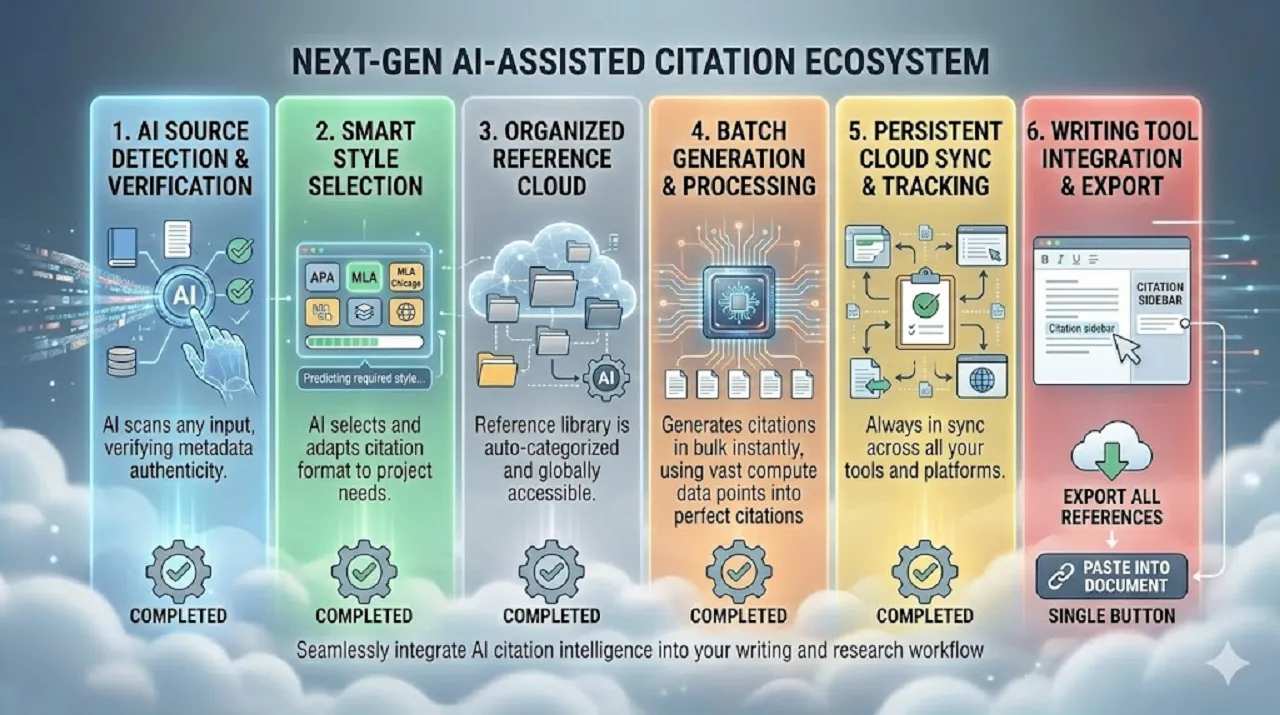
Emerging Trends

The Future of Citation Generators: Trends & Innovations

  • AI-Powered Citation Suggestions
    Artificial intelligence is enabling citation tools to automatically suggest relevant sources based on your content. This helps users discover credible references and improves the overall quality of their work.
  • Integration with Writing Tools
    Citation generators are being integrated directly into word processors, note-taking apps, and research platforms. This allows users to generate and insert citations without switching between multiple tools.
  • Automatic Source Detection
    Advanced tools can now scan URLs, documents, or PDFs to extract key information such as author names, titles, and publication dates automatically, reducing manual effort.
  • Cloud-Based Reference Management
    Cloud storage allows users to save, organize, and access their references from anywhere. This is especially useful for long-term research projects and collaborative work.

What This Means for Users

These advancements are transforming citation generators into complete research assistants. Users can expect:

  • Faster and more accurate citation creation
  • Reduced manual input and fewer errors
  • Seamless integration into writing workflows
  • Better organization of research materials

In the future, citation tools will not just generate references—they will actively assist in research, content creation, and academic writing, making the entire process more efficient and reliable.

Start Generating Your Citations Instantly – Free & Easy

Stop wasting time manually formatting references. Use our Citation Generator to instantly create accurate, professional citations in APA, MLA, Chicago, Harvard, IEEE, and Vancouver styles.

Free, fast, and online
Supports multiple citation formats
Batch citation support for multiple sources
Mobile and desktop-friendly
Secure, private, and easy-to-use

Generate your citations now and simplify your referencing workflow!

Frequently Asked Questions

Find quick answers to the most common questions about our SEO tools, pricing, and support. Everything you need to get started—right at your fingertips.

What is a Citation Generator?

A Citation Generator is an online tool that automatically formats references for books, articles, websites, journals, and other sources. It saves time and ensures your citations follow the correct style, such as APA, MLA, Chicago, Harvard, IEEE, or Vancouver.

Yes, our Citation Generator is completely free. It works online in your browser with no downloads, installations, or sign-ups required. You can generate accurate citations anytime, anywhere.

The tool supports all major citation formats, including:

  • APA (American Psychological Association)
  • MLA (Modern Language Association)
  • Chicago / Turabian
  • Harvard
  • IEEE
  • Vancouver

Yes! Our Citation Generator works with books, journals, websites, articles, reports, videos, and other source types. Simply enter the required details, and the tool formats your citation correctly.

Using the tool is simple:

  1. Choose your citation style (APA, MLA, etc.)
  2. Enter the source details (author, title, publisher, date, URL/DOI)
  3. Click Generate to create a formatted citation
  4. Copy the citation or export a complete bibliography
Can I generate multiple citations at once?

Yes! The tool includes batch citation support, allowing you to enter multiple sources and generate all citations simultaneously. This feature is perfect for large research papers, theses, or professional reports.

The generator is highly accurate and automatically formats citations according to each style’s rules. However, we recommend double-checking author names, titles, and URLs to ensure 100% correctness, especially for complex sources.

Absolutely. Students, educators, and researchers widely use our Citation Generator to create references for essays, dissertations, research papers, and journal submissions. It ensures proper formatting, saves time, and prevents errors.

Yes. All citation generation is done locally in your browser. We do not store, share, or collect any of your source information. Your work and source details remain private and secure.

Yes. You can edit the source details at any time and regenerate the citation. Keeping a separate record of your sources allows you to update references easily, ensuring your bibliography stays accurate and current.