
Most marketers obsess over backlinks. Yet the easiest SEO win lies inside your own site. A strong internal linking strategy quietly boosts rankings, dwell time, and authority without spending a dollar.
Internal links guide Google through your content. They pass PageRank, define topical clusters, and help users discover more pages. So mastering this single skill can transform any site in 2026.
This complete guide explains how to build a strong internal linking strategy, why it matters, and the free tools you can use to grow rankings naturally.
What Is an Internal Linking Strategy?
An internal linking strategy is a planned approach to connecting your site’s pages with each other. So instead of linking randomly, you create intentional pathways that help users and Google.
Done right, your site becomes a network of related, well-linked, authority-rich pages.
Why Internal Linking Strategy Matters in 2026
- Spreads PageRank across important pages
- Boosts crawl rate and indexing speed
- Builds topical authority faster
- Reduces bounce rate and improves dwell time
- Improves user navigation and conversions
So smart links can multiply the SEO power you already have.
Types of Internal Links You Should Use
1. Contextual Links
Links inside body content. They carry the most SEO value and improve user flow.
2. Navigational Links
Menus, headers, and footers. They define overall site structure for both users and Google.
3. Related Posts and Sidebar Links
Suggest more relevant content. Useful but lower priority compared to contextual links.
4. Breadcrumb Links
Show hierarchy and topical relationships. Great for SEO and accessibility.
5. Image and Banner Links
Anchor text comes from alt text. Audit using our Alt Attribute Checker.
Step-by-Step Internal Linking Strategy
Step 1 — Identify Your Pillar Pages
Choose 3–6 pages you want to rank highest. They become your topical “hubs”.
Step 2 — Build Cluster Posts
Write supporting blog posts that link back to each pillar. So the cluster grows in topical depth.
Step 3 — Audit Existing Links
Use our Website Links Count Checker to see how many internal links exist per page.
Step 4 — Add Contextual Links
Add 3–6 relevant internal links inside the body of every new post.
Step 5 — Use Smart Anchor Text
Mix branded, descriptive, and partial-match anchors. Audit ratios via our Anchor Text Distribution tool.
Step 6 — Fix Broken or Outdated Links
Use our Broken Link Checker to clean dead URLs.
Step 7 — Link to Money Pages Confidently
Service, product, or tool pages need link flow from blog posts. So always point traffic toward conversion pages.
Internal Linking Best Practices for 2026
- Use 3–10 internal links per blog post
- Keep anchors descriptive, not “click here”
- Link from older posts to newer ones often
- Avoid orphan pages with no internal links
- Refresh links during yearly content updates
Smart habits make every blog a stepping stone toward higher rankings.
Common Internal Linking Mistakes
- Overusing the same anchor text
- Linking only from the homepage
- Forgetting to interlink cluster posts
- Letting broken links pile up
- Linking only to weak or low-value pages
Each mistake leaks PageRank quietly — so audit them often.
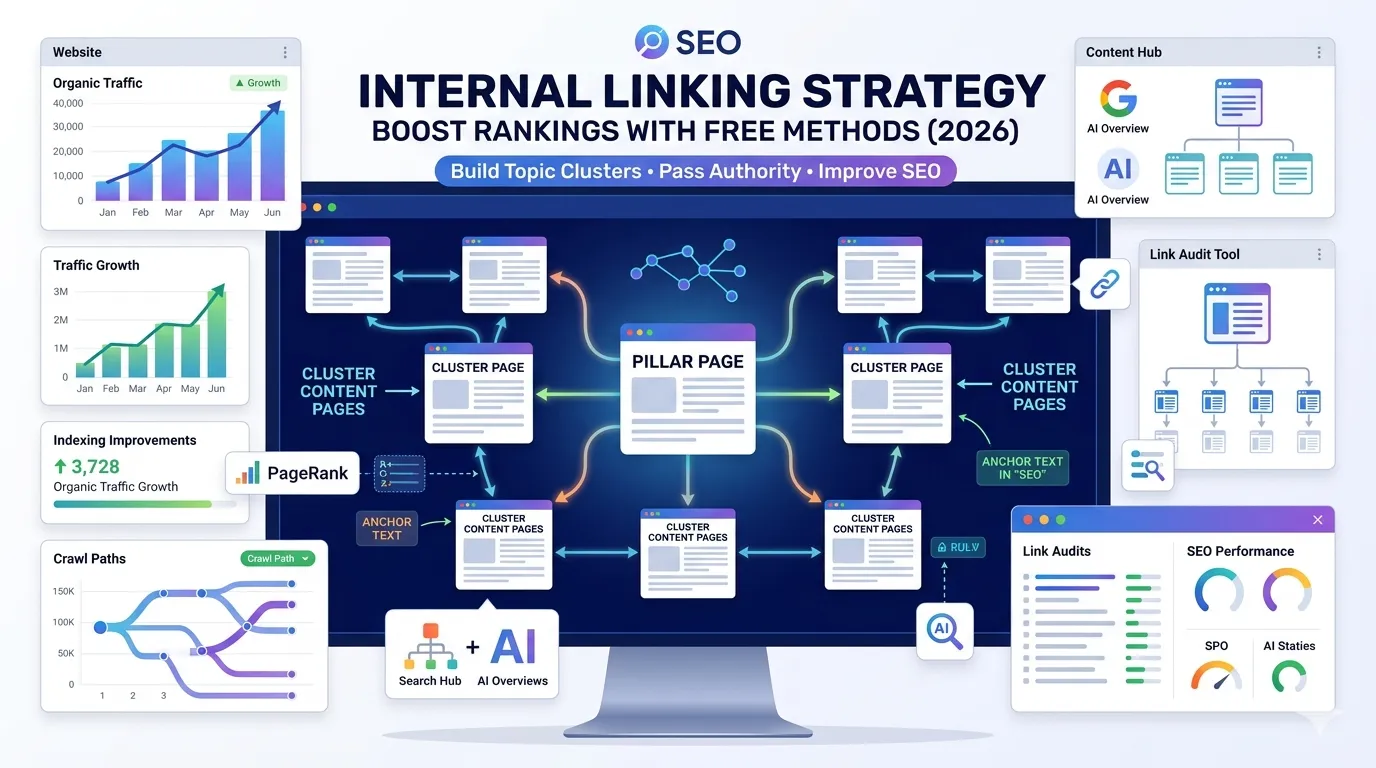
Pillar & Cluster Model Explained
- Pillar = broad, in-depth guide (e.g., “SEO Guide”)
- Cluster = supporting posts (e.g., “Keyword Difficulty”, “Heading Hierarchy”)
- Cluster posts link to the pillar
- The pillar links to all clusters
- Clusters can link to each other for depth
So this model creates the strongest internal linking strategy for modern SEO.
Anchor Text Tips That Boost Rankings
- Use exact match anchors sparingly
- Mix branded + partial + descriptive variations
- Avoid spammy or repeated phrases
- Match anchors to user intent
- Audit ratios using our Anchor Text Distribution tool
Natural anchors look smarter, rank better, and stay penalty-safe.
Smart Free Tools That Boost Internal Linking
- Website Links Count Checker — measure links per page
- Anchor Text Distribution — audit anchor ratios
- Broken Link Checker — fix dead links
- Website SEO Score Checker — site-wide health
Together, they form a complete internal SEO maintenance toolkit at zero cost.
How Internal Linking Helps With AI Overviews
- Helps AI understand topical context
- Boosts entity recognition
- Strengthens authority signals
- Increases chances of being cited as a source
- Supports cleaner schema relationships
So strong internal linking helps you win both classic and AI-driven search.
When to Audit Internal Links
- Every 3 months for active blogs
- After publishing 10+ new posts
- After deleting or merging old content
- After redesigns or theme changes
- When traffic suddenly stalls
Routine audits keep your link flow fresh, focused, and high-performing.
Final Thoughts
A strong internal linking strategy is one of the cheapest, fastest, and most underrated ways to boost SEO in 2026. With smart structure and the right tools, you grow rankings, traffic, and authority steadily — without buying a single backlink.
Start now with our free Website Links Count Checker. Audit your structure, build smart clusters, and turn every blog post into a step toward higher rankings.
FAQs
An internal linking strategy is a planned method of connecting your pages to spread SEO authority and improve user navigation.
Most strong posts use 3–10 internal links spread naturally inside the body content.
Yes. Internal links pass PageRank just like external ones, helping your important pages rank higher.
The pillar & cluster model is the most effective. Pillars link to clusters, clusters link back, and clusters interlink for depth.
Yes. AI search engines use internal links to understand topical relationships and authority.
Yes. New posts should reference old supporting posts, and old posts should be updated to link to new ones.
Every 3 months for active sites. More often if you publish frequently or remove old content.